
An operations maker needs a Copilot Studio topic to create a Dataverse work order after the user confirms details. The team already has a Power Automate cloud flow that creates the work order. What is the correct way to invoke that flow from the topic?
Select an answer to reveal the explanation.
Short Explanation
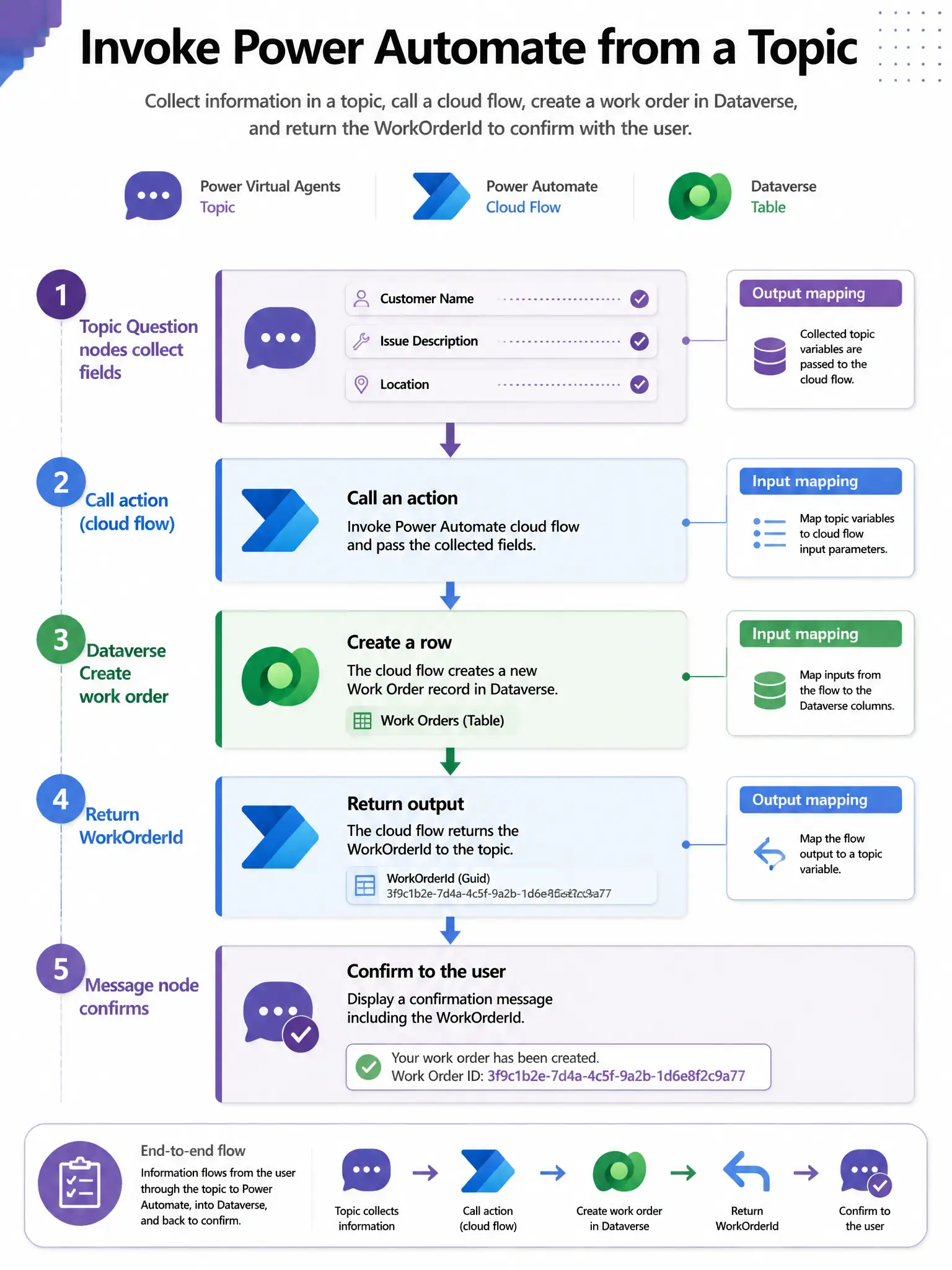
Cloud flows are the agent's hands, so wire the existing flow in as an action/tool, pass the confirmed details as inputs, and read the work order ID back for the confirmation. Don't make the user click a webhook link or upload the flow as knowledge; that won't create the record.
Full Explanation
Copilot Studio integrates with Power Automate by registering instant (manually triggered) cloud flows as actions/tools. The topic collects inputs, the flow runs with those parameters, and outputs return to the conversation for messaging or branching. The correct pattern is to add the cloud flow as an action/tool in the topic or agent tools, map topic variables to the flow inputs, and map flow outputs back to topic variables for the confirmation message. Mapping topic variables to flow inputs and outputs is the supported pattern for transactional work like creating a Dataverse work order. Pasting the flow's HTTP webhook URL into a Message node so the user can click it to run the flow outside the agent is wrong because it breaks conversational continuity, authentication context, and automated confirmation inside the topic. Exporting the flow as a JSON file and uploading it as a knowledge source so generative answers create the work order is wrong because knowledge sources are for retrieval-augmented answers, not for executing business process automation. Calling Dataverse from a raw HTTP action in the topic using the maker's personal refresh token stored in a text environment variable is wrong because storing personal tokens in plain text environment variables is insecure and not the recommended Dataverse integration path; use connectors/flows with proper connection references and least-privilege identities. Exam tip: Instant cloud flow + input/output parameters = standard plugin/action pattern for write operations.