
What does the 'Restrict deletions' rule in GitHub repository rulesets or branch protection do?
Select an answer to reveal the explanation.
Short Explanation and Infographic
Restrict deletions prevents accidental (or malicious) branch/tag deletion. Even admins can't delete a protected branch without the bypass permission. This saves your 'main' or 'release-v2.0' tag from being wiped with a single git push --delete command.
Full explanation below image
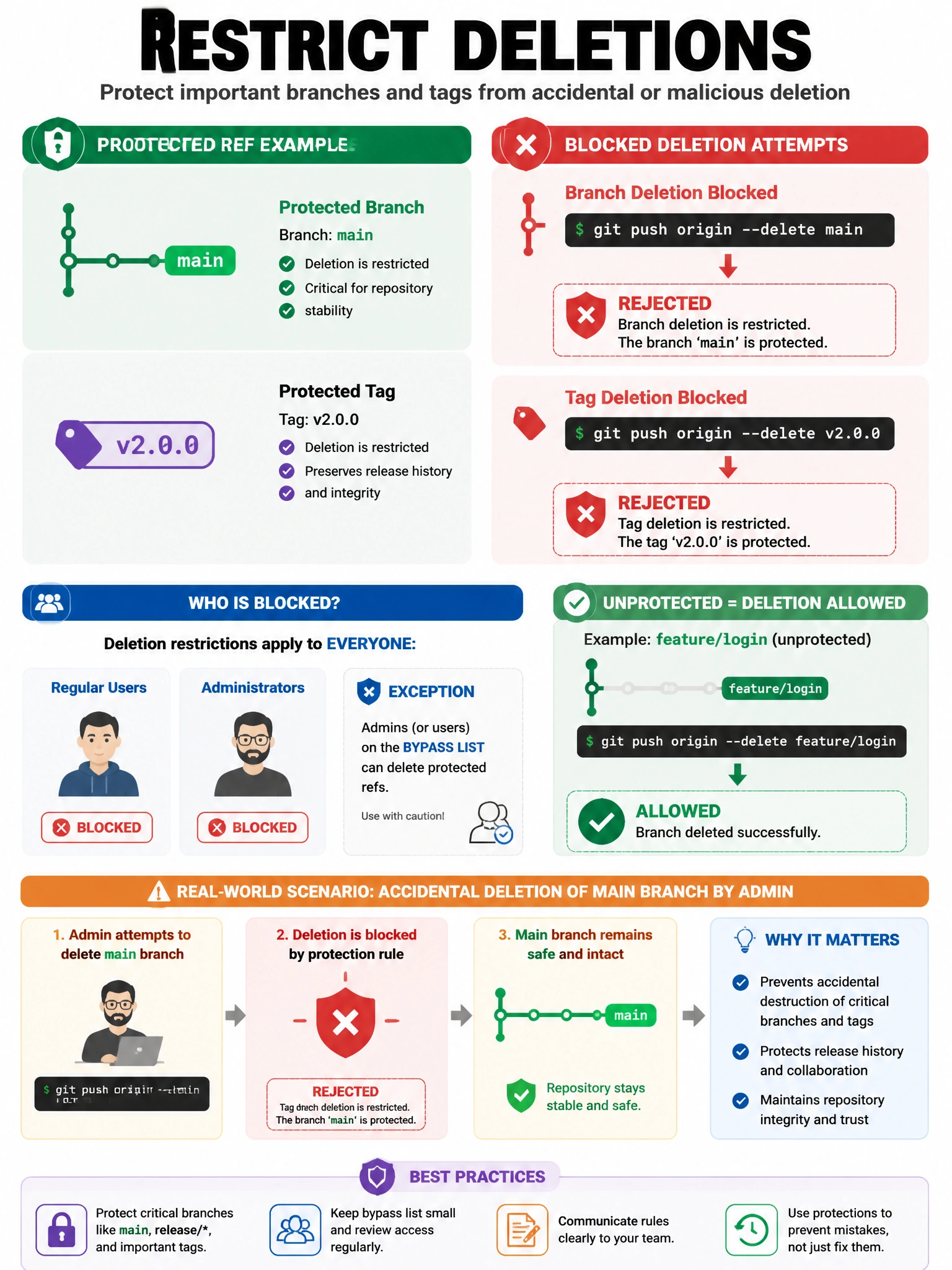
Full Explanation
The 'Restrict deletions' rule in GitHub repository rulesets (or 'Allow force pushes' counterpart in branch protection) prevents deletion of branches or tags that match the ruleset's target pattern. When enabled: (1) git push --delete <branchname> is rejected for protected branches. (2) Deleting a tag via the GitHub UI or API is blocked for protected tags. (3) Even repository administrators cannot delete the protected branches without appropriate bypass permission (in rulesets) or disabling the protection first (in branch protection rules). This protects: release branches (release/v2, maintenance/1.x), the main/master branch, semantic version tags (v1.0.0). It's separate from force push protection and prevents accidental or unauthorized destruction of important references.