
What is the difference between GitHub organization 'base permissions' and team permissions?
Select an answer to reveal the explanation.
Short Explanation and Infographic
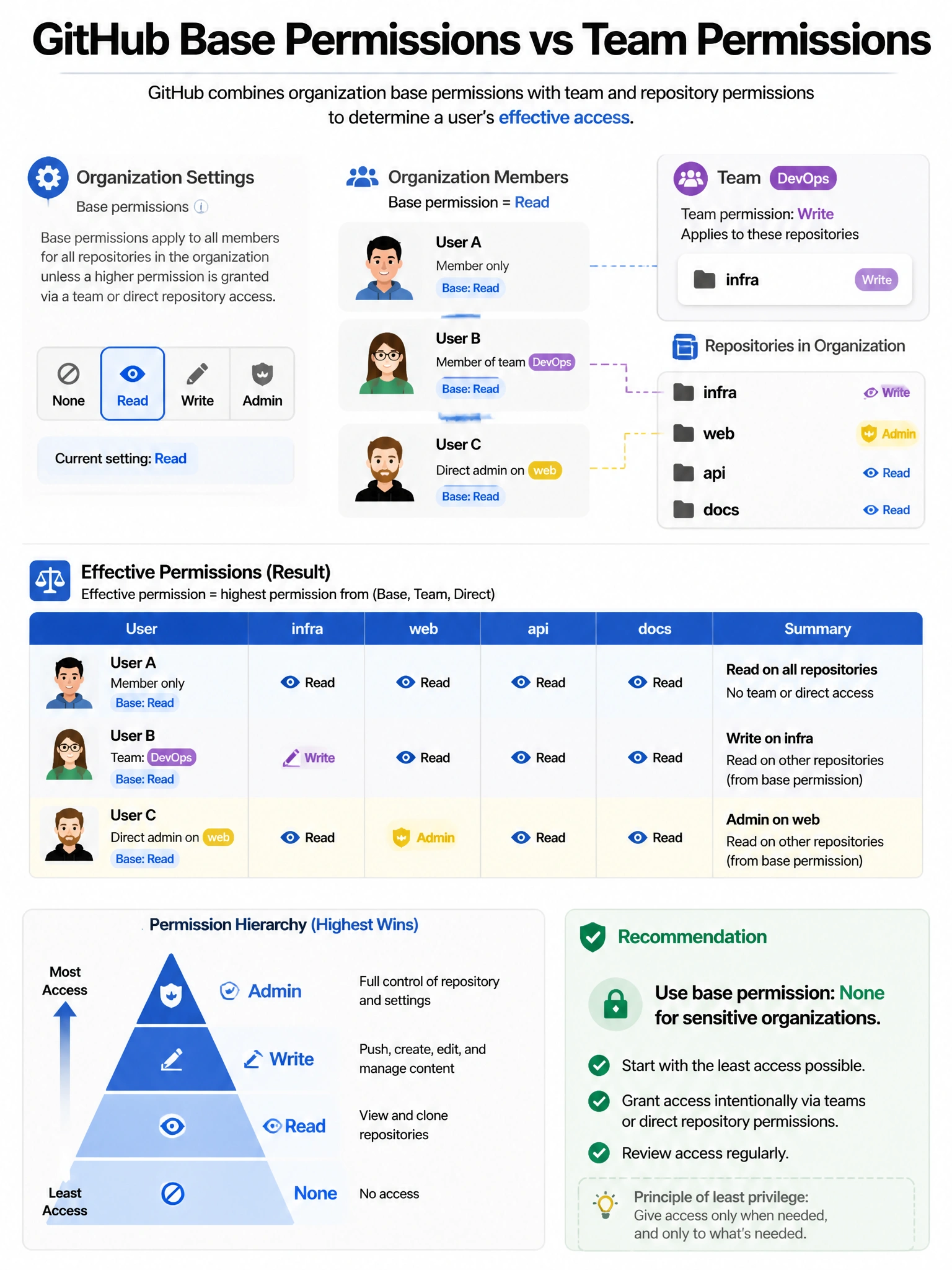
Base permissions are the floor for everyone in the org. If you set base permissions to 'Read,' every member can at minimum read all repos. Teams can elevate that — give the DevOps team 'Write' on infrastructure repos. The effective permission is the higher of base or team permission.
Full explanation below image
Full Explanation
GitHub organizations have two layers of access control: (1) Base permissions — set in Organization Settings, defines the minimum permission level ALL organization members have to ALL repositories in the organization. Options: None (no access by default), Read, Write, Admin. This is a blanket setting. (2) Team permissions — specific teams can be granted different permission levels to specific repositories. Teams can provide access above the base permission level. Effective permission resolution: a user's permission on a specific repository is the HIGHEST of their base permission, any team permission they have on that repository, or direct collaborator permission. Example: base=Read, DevOps team=Write on 'infrastructure' repo → DevOps team members have Write on 'infrastructure'. Security recommendation: set base to 'None' for sensitive organizations and grant access explicitly through teams.