
What does GitHub's 'push protection' for secret scanning do, and how can it be bypassed?
Select an answer to reveal the explanation.
Short Explanation and Infographic
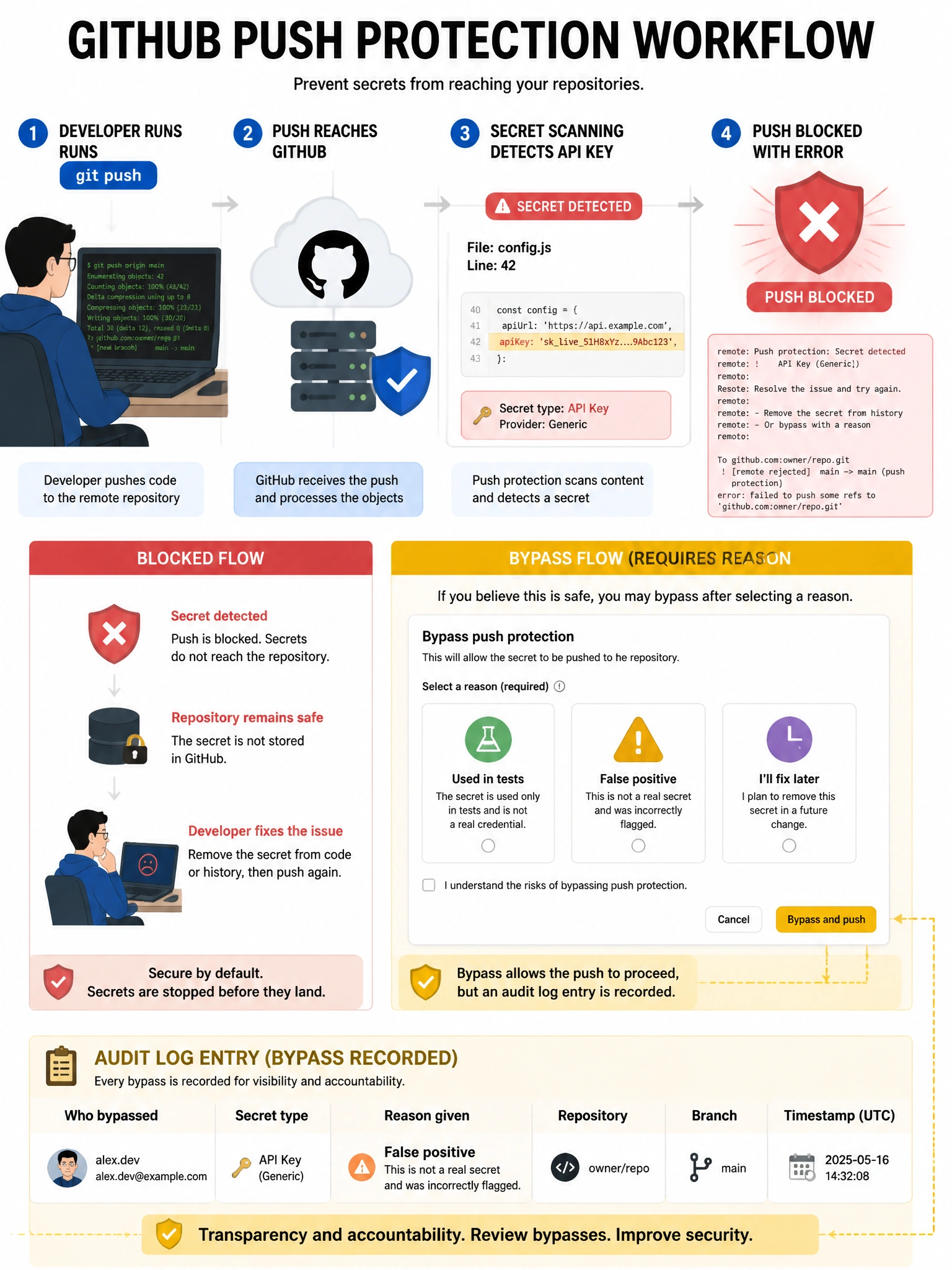
Push protection catches secrets before they land in the repo. If you try to push a commit with an AWS key GitHub recognizes, the push is blocked. You can bypass it — but you have to give a reason, which gets logged. That audit trail is what makes it a real control, not just an inconvenience.
Full explanation below image
Full Explanation
GitHub Advanced Security's push protection inspects commits at push time and blocks pushes containing detected secrets. When a secret is detected: (1) The push is rejected with an error message naming the detected secret type and location. (2) The developer has options: remove the secret from the commit and push again, or bypass the protection. (3) Bypass requires selecting a reason: 'it's used in tests', 'it's a false positive', or 'I'll fix this later'. (4) All bypass events are logged in the organization's audit log with the developer's identity, reason, and secret type. Push protection is the first line of defense — preventing exposure before the secret exists in git history (much easier than rotation and cleanup after the fact). Available for both GitHub.com with GHAS and GHES.