
What is a GitHub 'project' (GitHub Projects) and how does it differ from issues?
Select an answer to reveal the explanation.
Short Explanation and Infographic
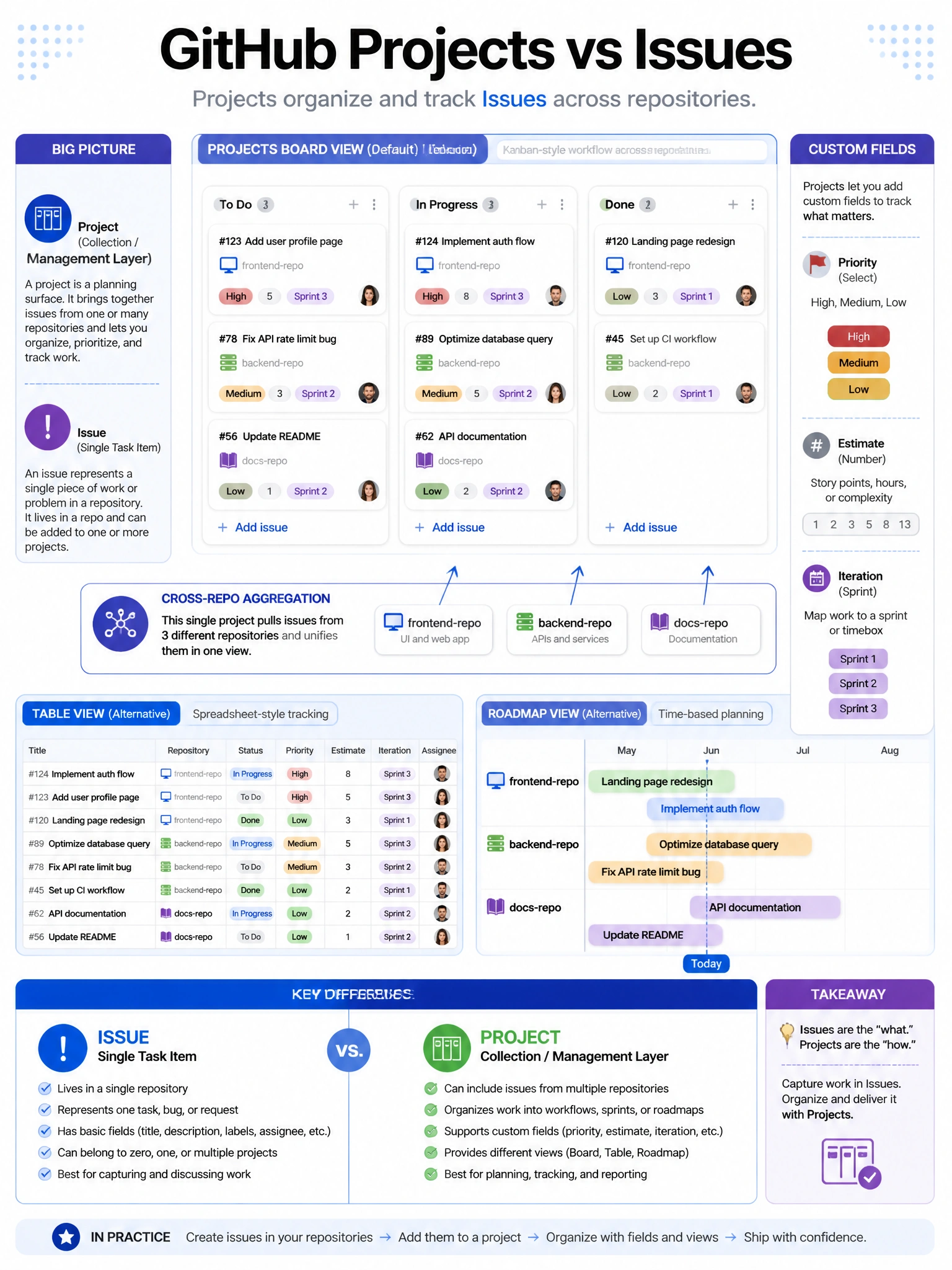
GitHub Projects is your kanban-meets-spreadsheet work tracker. It pulls in issues and PRs from any repo and lets you build custom views — boards, tables, roadmaps. Issues are the individual work items; Projects is the management layer on top.
Full explanation below image
Full Explanation
GitHub Projects (Projects v2) is a flexible project management tool that aggregates issues and pull requests from one or more repositories. Key capabilities: (1) Multiple views — board (kanban), table (spreadsheet-like), and roadmap (timeline/Gantt). (2) Custom fields — text, number, date, single select, iteration fields for any metadata needed. (3) Cross-repository — a single project can include issues from multiple repos. (4) Automation — rules to automatically update project fields based on issue/PR state changes. (5) Filtering and grouping — slice and sort by any field. Issues are the atomic units of work; Projects provide the organizing layer. Projects don't replace issues — they provide management views across them. Projects can be owned by organizations (team project management) or individual users.