
What is the 'watch' functionality in GitHub repositories and how does it affect notifications?
Select an answer to reveal the explanation.
Short Explanation and Infographic
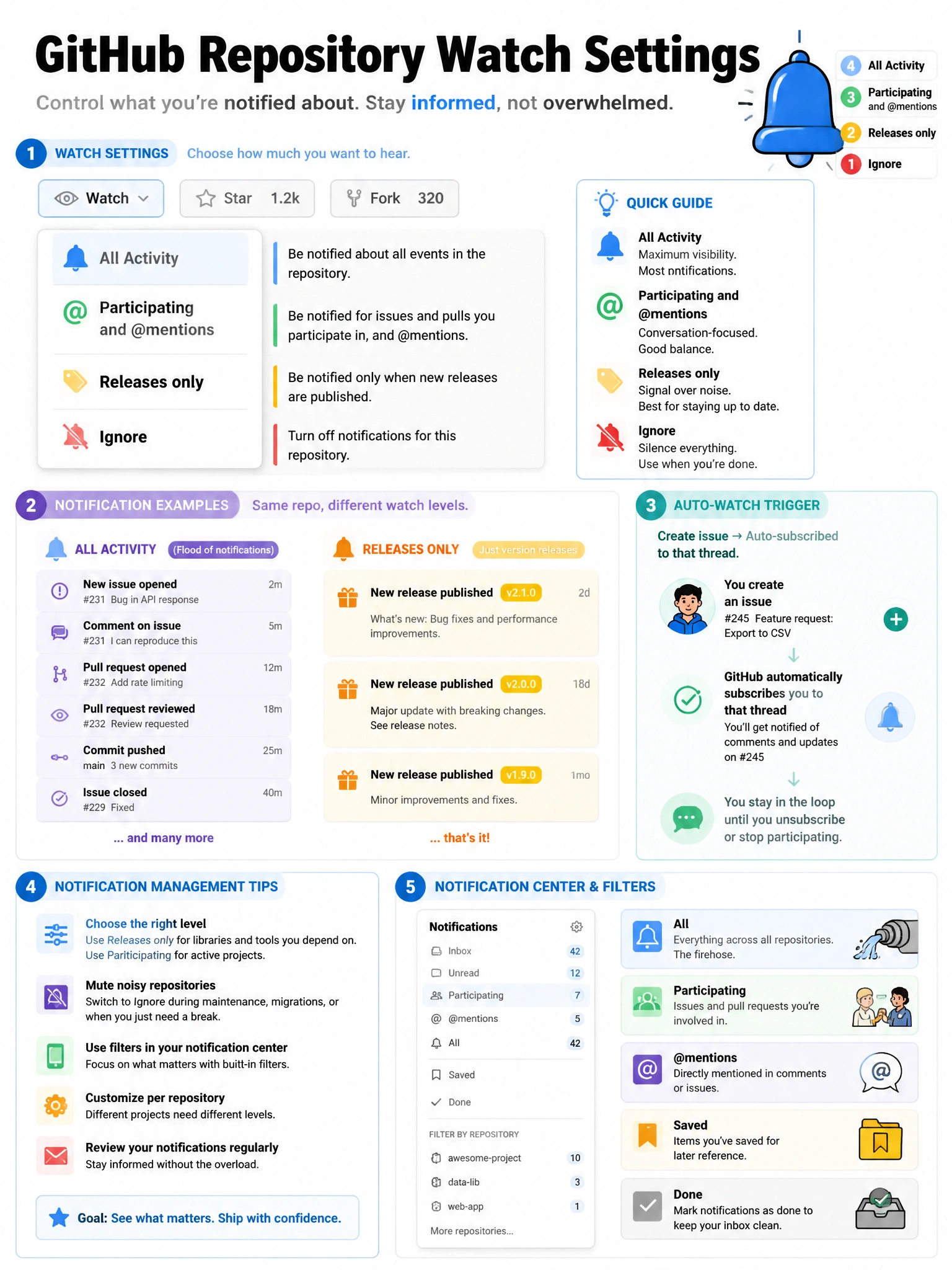
Watching is your notification subscription dial for a repository. Watch a repo and GitHub pipes all the activity to your notifications — new issues, PRs, comments, CI results, everything. You can tune the watch level to reduce noise.
Full explanation below image
Full Explanation
GitHub's 'Watch' feature allows users to subscribe to activity notifications for a repository. GitHub provides granular watch options: (1) 'All Activity' — notified of all issues, PRs, discussions, releases, and comments. (2) 'Participating and @mentions' — only notified when you participate in discussions or are mentioned. (3) 'Releases only' — only notified of new releases. (4) 'Ignore' — no notifications even for direct participation. Users are automatically added as watchers when they create an issue or PR in a repository they're not already watching. For repositories you own, all activity is on by default. For large repositories, aggressive watching generates significant notification volume, so GitHub's default has become 'Participating and @mentions' to reduce noise.