
What is the purpose of the 'cache' action in GitHub Actions workflows?
Select an answer to reveal the explanation.
Short Explanation and Infographic
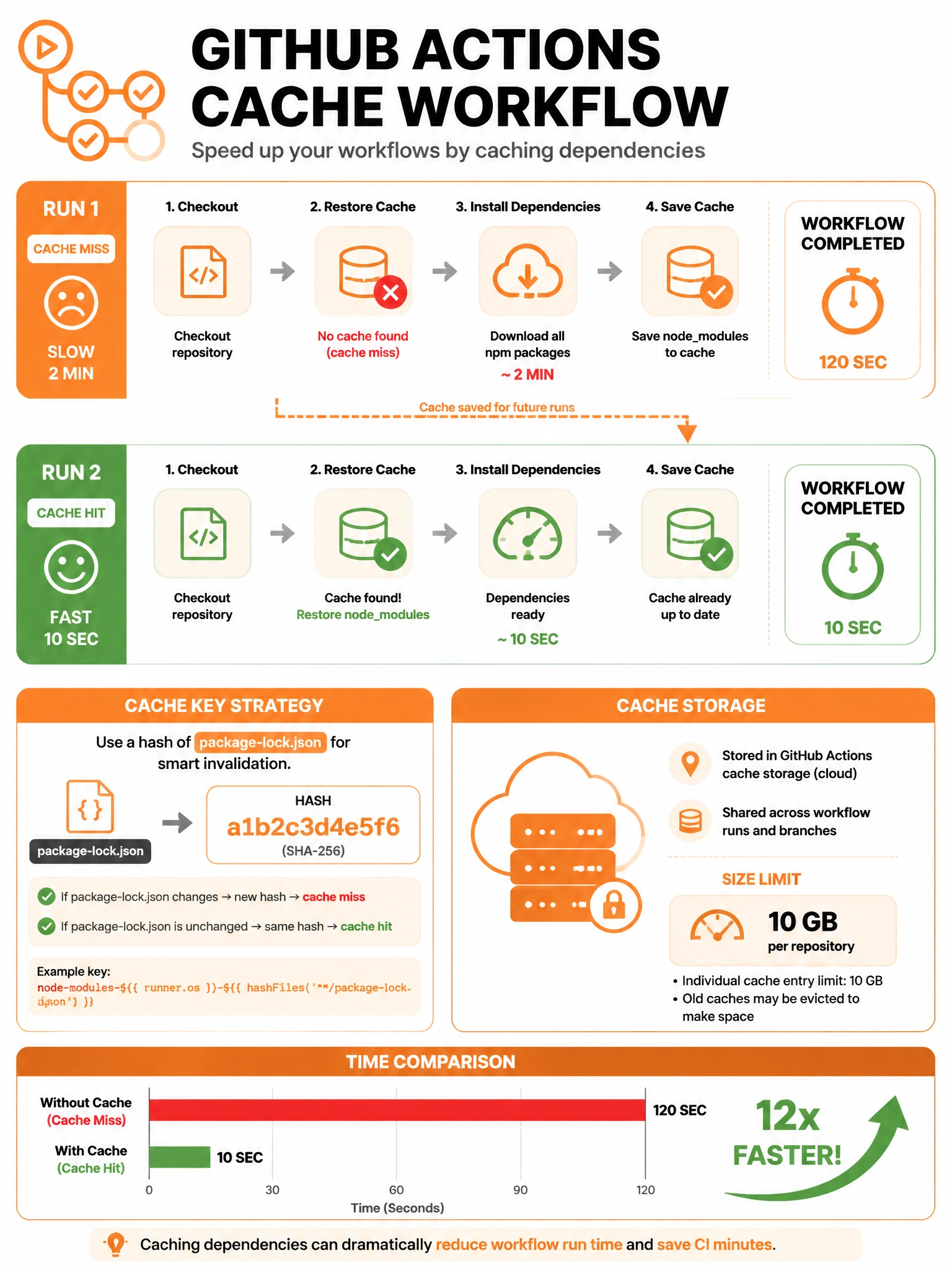
Cache in GitHub Actions is your time machine for build dependencies. Instead of downloading 500 npm packages on every run, you cache the node_modules folder and restore it next time. Dramatically cuts build times when deps don't change.
Full explanation below image
Full Explanation
The actions/cache action in GitHub Actions saves and restores files between workflow runs using a cache key. How it works: (1) Before the job steps, the cache action checks if a cache exists for the given key. (2) If a cache hit occurs, the cached files are restored. (3) After the job completes (if it was a cache miss), the cache action saves the specified files/directories for future runs. Common use cases: node_modules (npm/Yarn), .pip/ or virtualenv (Python pip), .m2/ (Maven), target/ (Gradle), Go module cache. Cache is scoped to branches — cache on main is accessible to PRs from that branch. Cache size limits apply per repository (typically 10 GB). Cache significantly reduces CI run duration for dependency-heavy projects.