
What is GitHub's 'push protection' feature in secret scanning?
Select an answer to reveal the explanation.
Short Explanation and Infographic
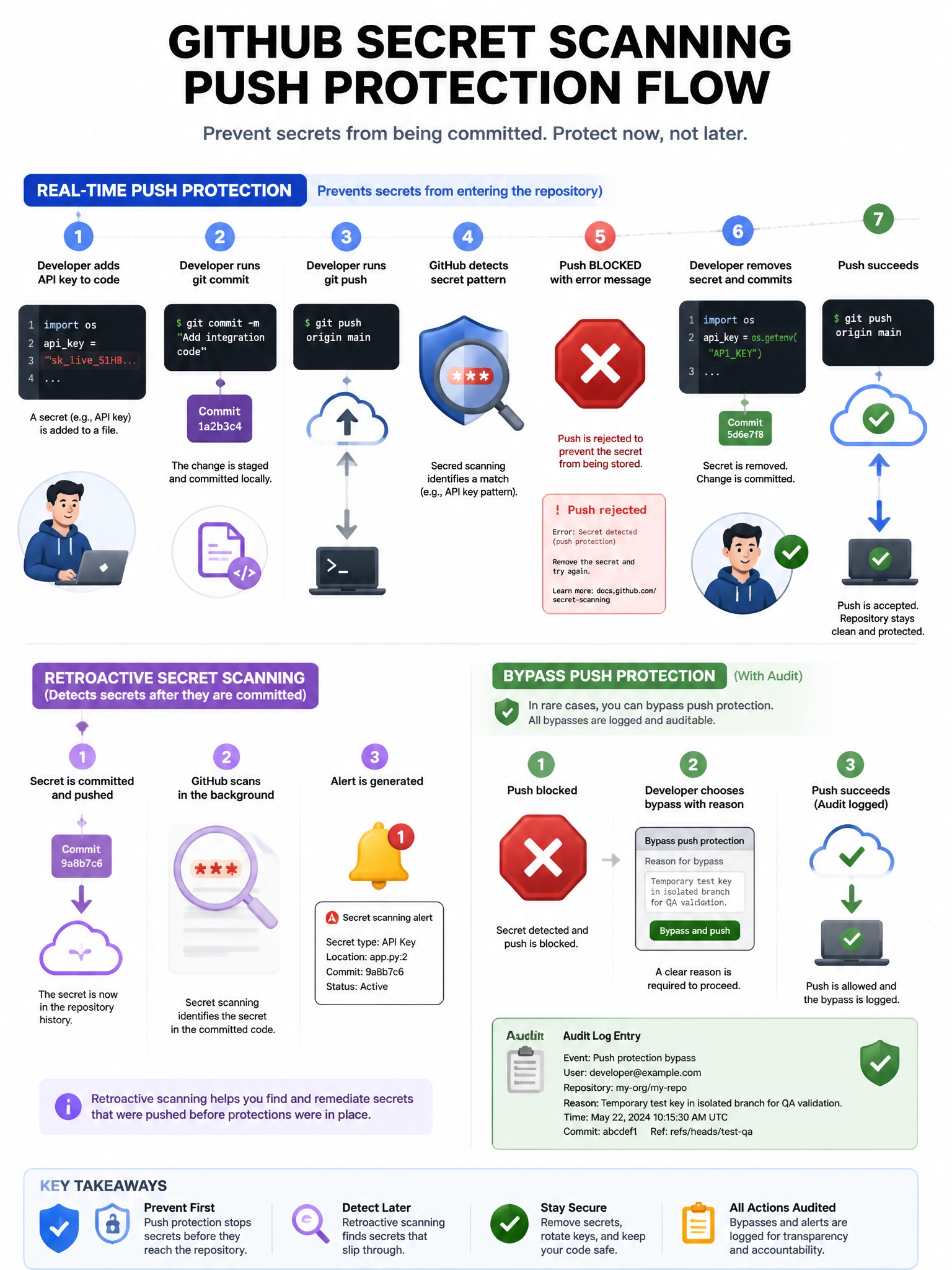
Push protection is the proactive cousin of secret scanning. Instead of alerting you after a secret gets committed, it intercepts the push and says 'hold on — I see a credential in this commit' and blocks it from ever landing in the repo.
Full explanation below image
Full Explanation
Secret scanning Push Protection is a proactive security feature that analyzes commit content before it is pushed to GitHub and blocks pushes that contain recognized secret patterns. When a developer attempts to push a commit containing a secret (like an API key or token), GitHub rejects the push and displays a detailed error message identifying the secret type and location. Developers can then remove the secret before pushing. In contrast, standard secret scanning is retroactive — it finds secrets already in the repository and generates alerts. Push protection can also be configured to allow bypasses for specific cases (e.g., test credentials) with audit trail. It requires GitHub Advanced Security for private repositories.