
What is the purpose of the 'workflow_dispatch' event in GitHub Actions?
Select an answer to reveal the explanation.
Short Explanation and Infographic
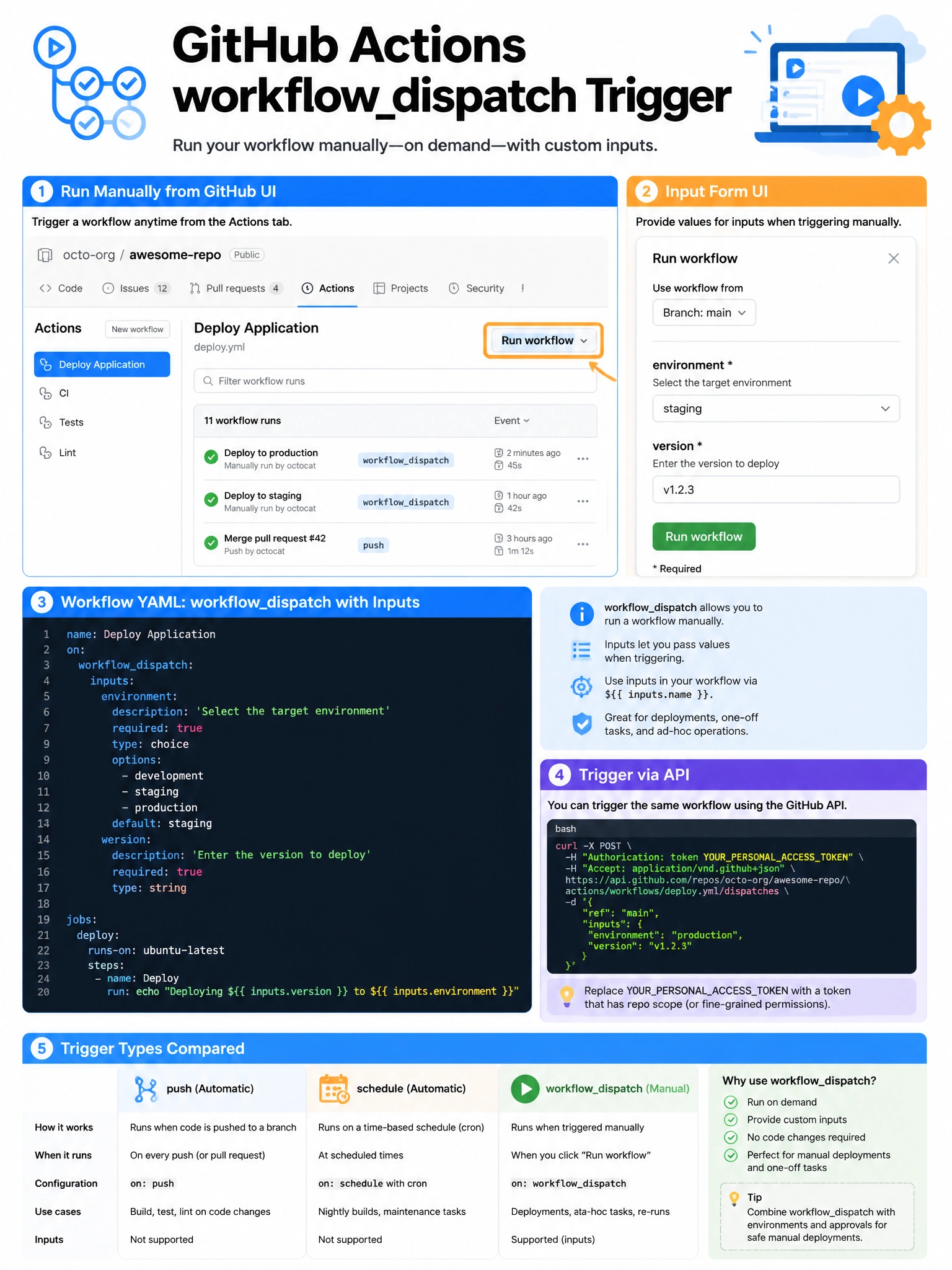
workflow_dispatch is your manual trigger button. Add it to your workflow, and suddenly there's a 'Run workflow' button in the GitHub Actions UI. You can even add inputs so users can customize the run — like a parameterized deployment button.
Full explanation below image
Full Explanation
The 'workflow_dispatch' event trigger enables manual triggering of GitHub Actions workflows. When a workflow includes 'on: workflow_dispatch', a 'Run workflow' button appears in the Actions tab of the repository. Administrators and users with appropriate permissions can trigger the workflow on demand, selecting the branch to run on. Workflows can define 'inputs' for workflow_dispatch that become form fields in the UI, allowing customization (e.g., environment to deploy to, version number). The workflow can also be triggered via the GitHub API's workflow dispatch endpoint. This is different from push triggers, scheduled triggers (using 'cron' under 'schedule'), and repository_dispatch (for external system triggers).