
Spark MLlib's VectorAssembler fails when input columns contain null values. Which parameter controls how VectorAssembler handles nulls?
Select an answer to reveal the explanation.
Short Explanation and Infographic
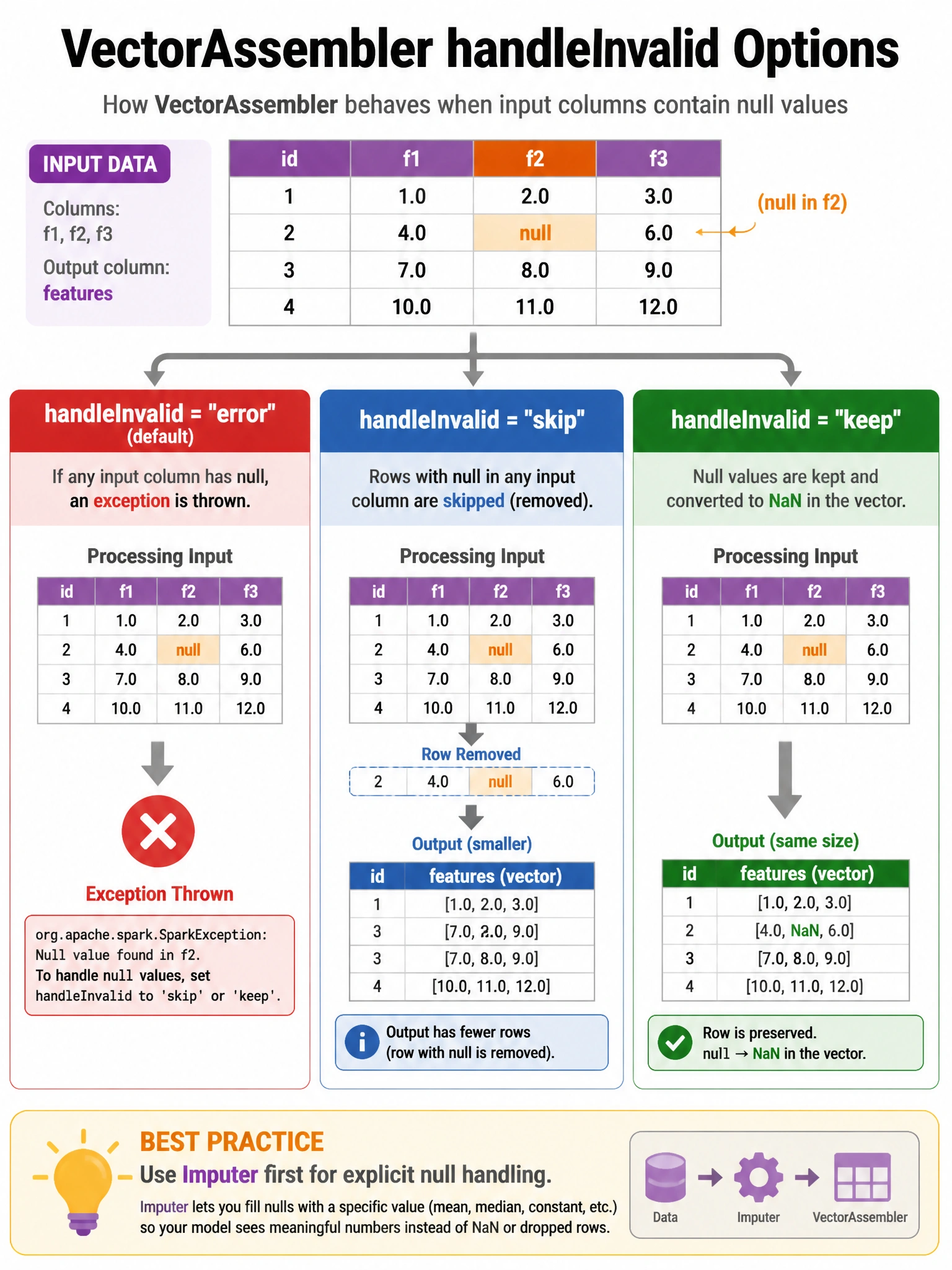
VectorAssembler's handleInvalid parameter has three modes: 'error' (crash on nulls — the default), 'skip' (drop null rows), and 'keep' (put NaN in the vector and let the model handle it).
Full explanation below image
Full Explanation
VectorAssembler(inputCols=['a','b','c'], outputCol='features', handleInvalid='keep') controls null handling with three options: 'error' (default) — raises exception if any null found in input columns. Good for catching data quality issues early. 'skip' — rows with any null in any input column are dropped from the output DataFrame. Be careful: silent data loss in production. 'keep' — null values are converted to NaN (Not a Number) in the Vector. Some algorithms handle NaN (tree-based models), others don't (linear models, which treat NaN as 0). Best practice: use Imputer before VectorAssembler to handle nulls explicitly with a learned strategy (mean/median/mode). VectorAssembler does NOT have nullStrategy='impute' or automatic zero-filling — those require Imputer.