
When using Databricks Repos for ML project versioning, which MLflow tag is automatically set to help link runs to specific code versions?
Select an answer to reveal the explanation.
Short Explanation and Infographic
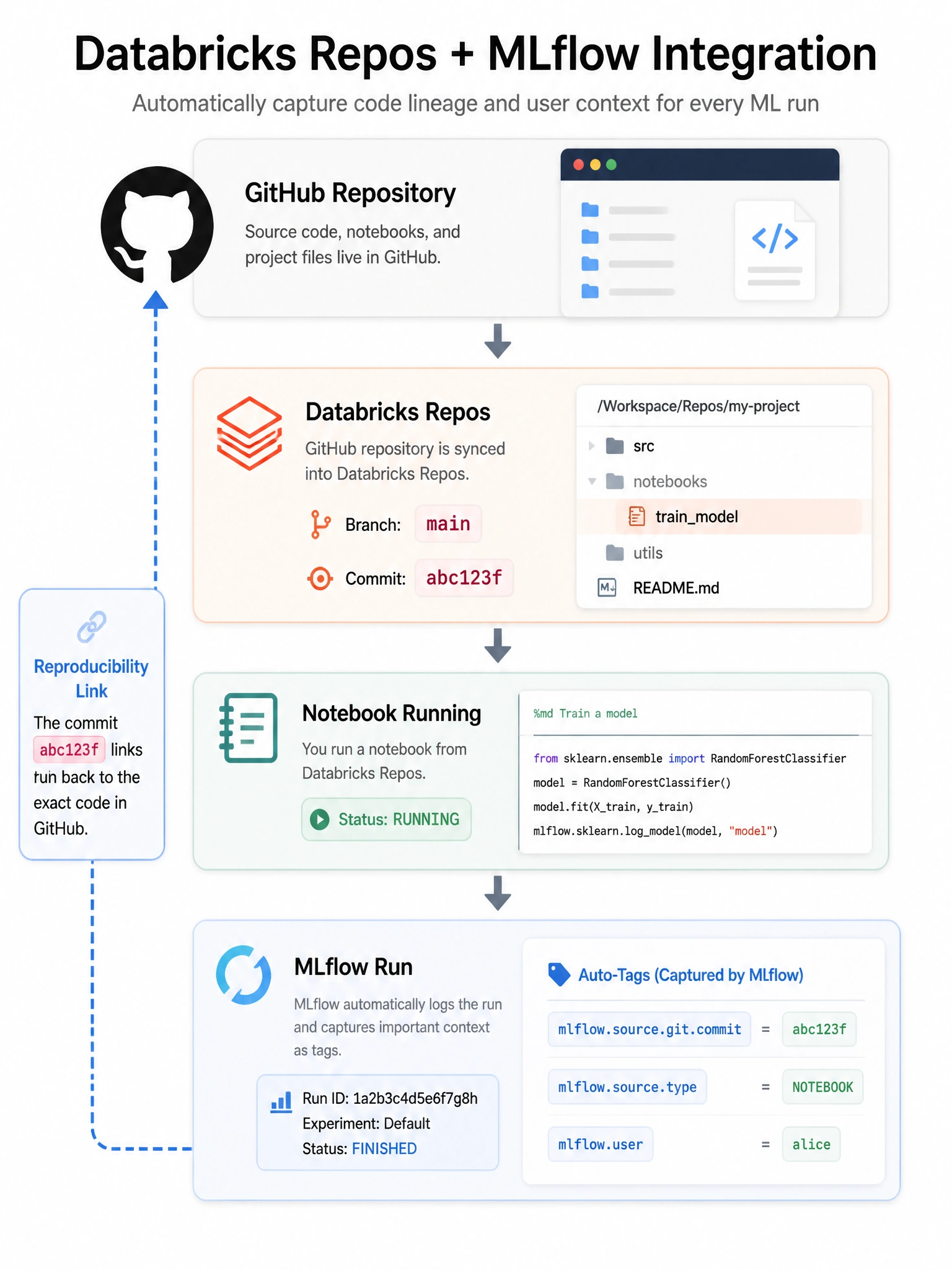
MLflow automatically captures the git commit hash in a tag called mlflow.source.git.commit — making it easy to trace any run back to the exact code that produced it.
Full explanation below image
Full Explanation
When running notebooks from Databricks Repos, MLflow automatically sets several source tags on each run: mlflow.source.type (NOTEBOOK), mlflow.source.name (notebook path), mlflow.source.git.commit (git commit hash of the Repos branch HEAD). This enables reproducibility: given any MLflow run, you can look up mlflow.source.git.commit to find the exact code version, check it out from Git, and reproduce the run. You can also set git-related tags manually: mlflow.set_tag('mlflow.source.git.branch', 'feature/new-model'). Additional auto-set tags in Databricks: mlflow.databricks.notebookID, mlflow.databricks.clusterID, mlflow.user. The tag name mlflow.git.hash, databricks.repo.commit_id, and mlflow.code.version are not standard MLflow tags.