
A team wants to A/B test a new model version against the current production model on Databricks Model Serving. Which feature enables this?
Select an answer to reveal the explanation.
Short Explanation and Infographic
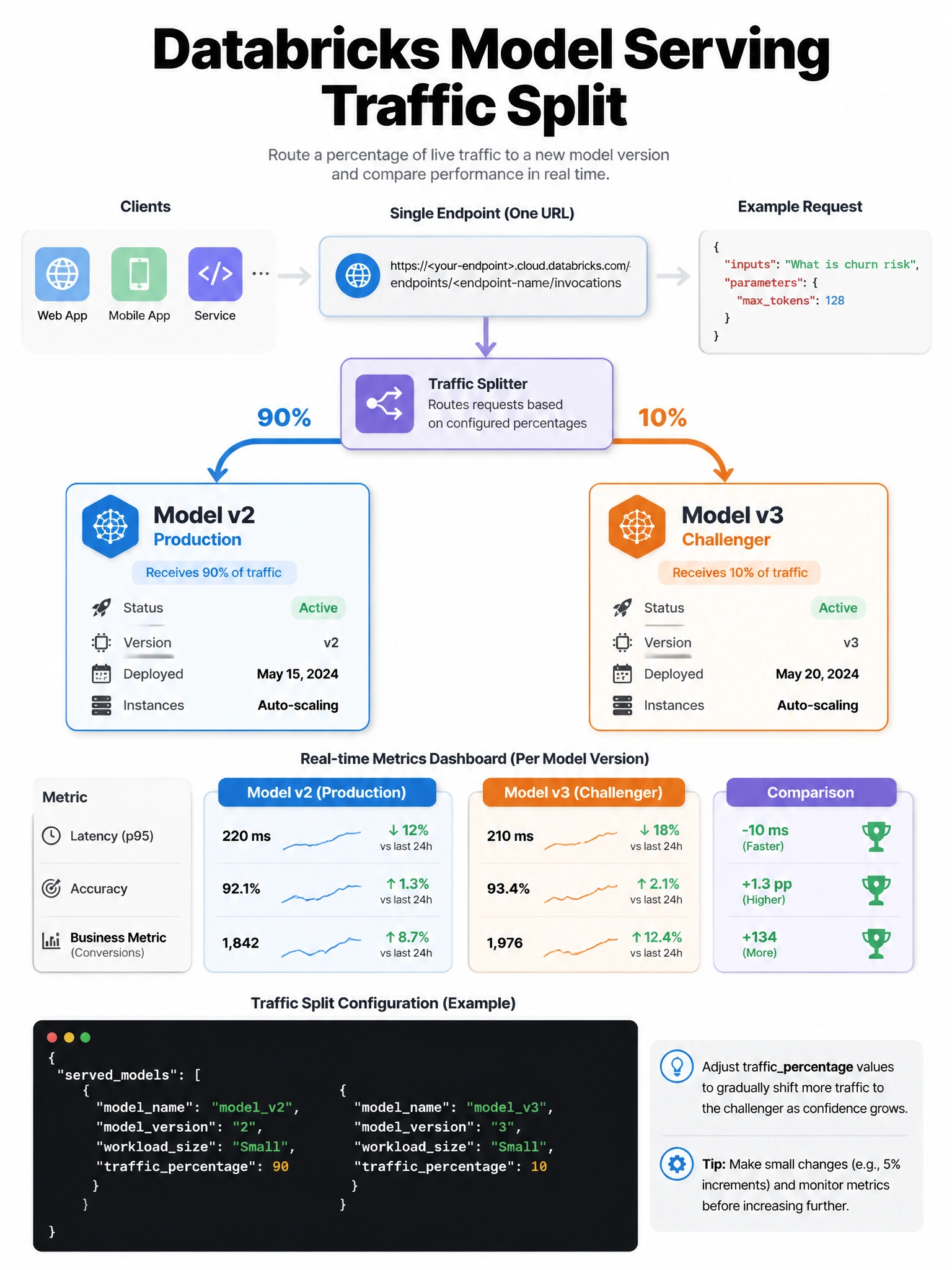
Databricks Model Serving lets you configure traffic splits at the endpoint level — send 90% of traffic to the current model and 10% to the challenger, all behind a single URL.
Full explanation below image
Full Explanation
Databricks Model Serving endpoints support multi-model configurations with traffic splitting. In the endpoint configuration, you can specify: served_models = [{'model_name': 'fraud_v2', 'model_version': '5', 'traffic_percentage': 90, 'workload_size': 'Small'}, {'model_name': 'fraud_v3', 'model_version': '1', 'traffic_percentage': 10, 'workload_size': 'Small'}]. The endpoint URL stays the same — Databricks routes incoming requests according to the traffic split. This enables: A/B testing (measure business metrics per model version), canary deployments (gradually shift traffic from old to new), shadow mode testing (send copy of traffic to new model without affecting production). Traffic splits must sum to 100%. Results are logged and can be compared using MLflow or Databricks monitoring.