
A hospital administrator opens App Hub to change the organization's single sign-on trust and cannot find the identity provider settings. Where do those single sign-on settings belong?
Select an answer to reveal the explanation.
Short Explanation
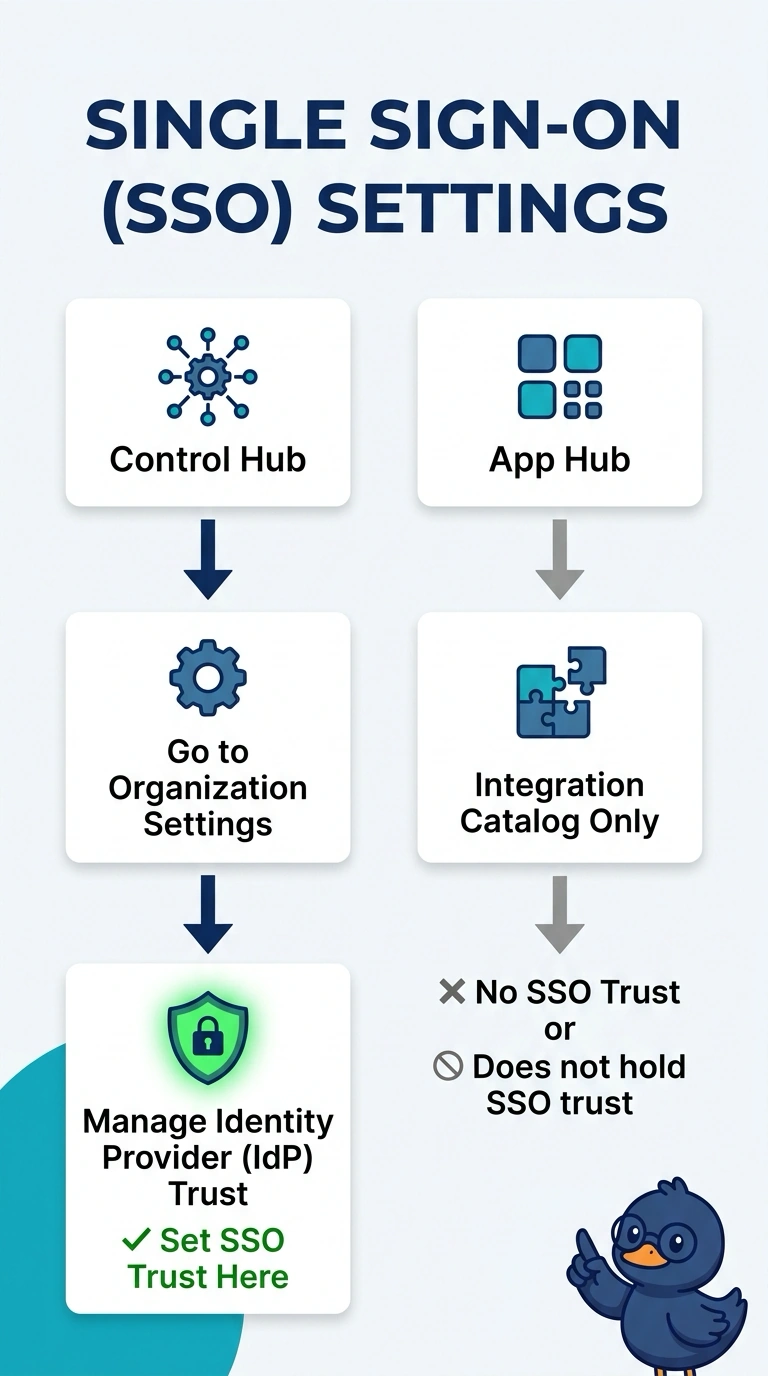
Think of looking for the building's master lock combination inside the catalog of optional add-on gadgets. You change single sign-on in the Control Hub organization settings, because App Hub only lists integrations. The trap is treating a catalog entry as the identity-provider trust.
Full Explanation
Single sign-on sends the user to the enterprise identity provider, and that trust is an organization setting in Control Hub. App Hub is where you find and add integrations, so it does not hold the single sign-on trust, which is why the identity provider settings are missing there. A new App Hub catalog entry adds an integration and is not the store for the organization's identity-provider trust. The Developer Portal is where you build apps and bots and manage their credentials, and a bot credential is not where the organization keeps its single sign-on signing trust. A RoomOS macro runs on a device and can use the xAPI, and writing an address onto a device does not configure the organization identity provider. Exam caveat: a broken signing certificate can keep single sign-on out of the path, and that is not repaired by adding an integration in the catalog. Verify the organization’s identity provider metadata and test the SSO flow in Control Hub. Operational check: open the organization single sign-on settings in Control Hub, confirm the identity provider is the one the hospital uses, and sign in a test user to see the redirect.