
A managed service provider runs TACACS+ device administration in ISE, with every administrator authenticating against Active Directory. NetOps members must reach privilege 15 on the access switches, while Helpdesk members must sit at privilege 1 with only show commands on those same switches. Which ISE design delivers these two shell outcomes through the device admin policy set?
Select an answer to reveal the explanation.
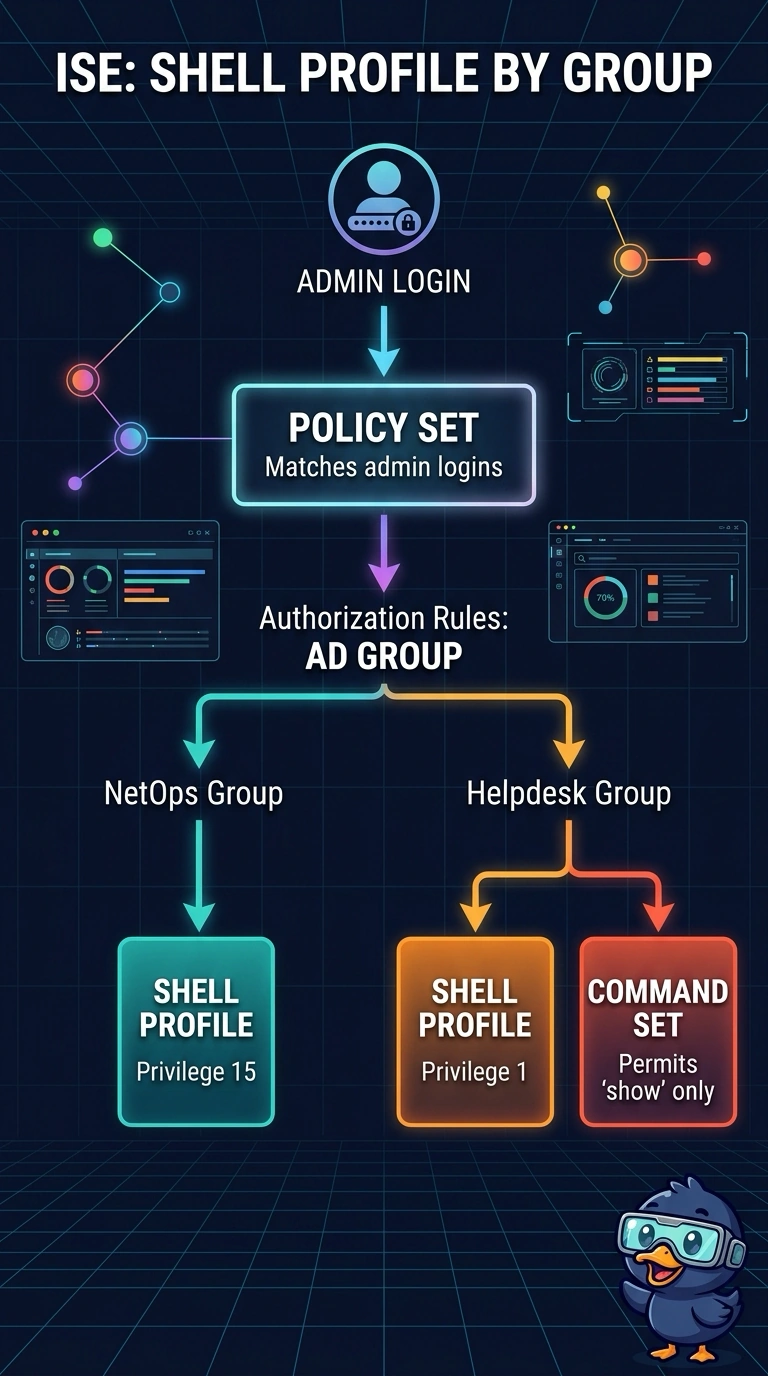
Short Explanation
You’ll use authorization rules to match each admin’s AD group and return the right shell profile, giving NetOps privilege 15 and Helpdesk privilege 1. Think of the Helpdesk command set as a separate gate: it must allow only show commands, since the shell profile alone won’t restrict commands.
Full Explanation
In ISE, device admin policy set conditions select the overall policy flow, and authorization rules within that flow select the TACACS+ results. Match the AD group to return the appropriate shell profile for each role: privilege 15 for NetOps and privilege 1 for Helpdesk. To restrict Helpdesk to show commands, also return a command set that permits only those commands. A privilege-15 shell profile with a restrictive command set would still leave the session at privilege 15, so it does not meet the Helpdesk privilege requirement. Matching the network device cannot distinguish the two groups on the same switch. Network access authorization profiles provide RADIUS results, such as VLAN and dACL assignments, rather than the TACACS+ shell profile and command set used for device administration. A practical check is to log in with each account, run show privilege, and verify the Helpdesk command restriction.