
A security team deploys the Secure Firewall Management Center as a virtual appliance on an ESXi host at headquarters and must onboard a branch FTD that has never had a manager configured. Console access to the FTD is available, both management interfaces can communicate over the required management ports, and the team holds FMC admin rights. Which registration procedure binds the branch FTD to the virtual Management Center?
Select an answer to reveal the explanation.
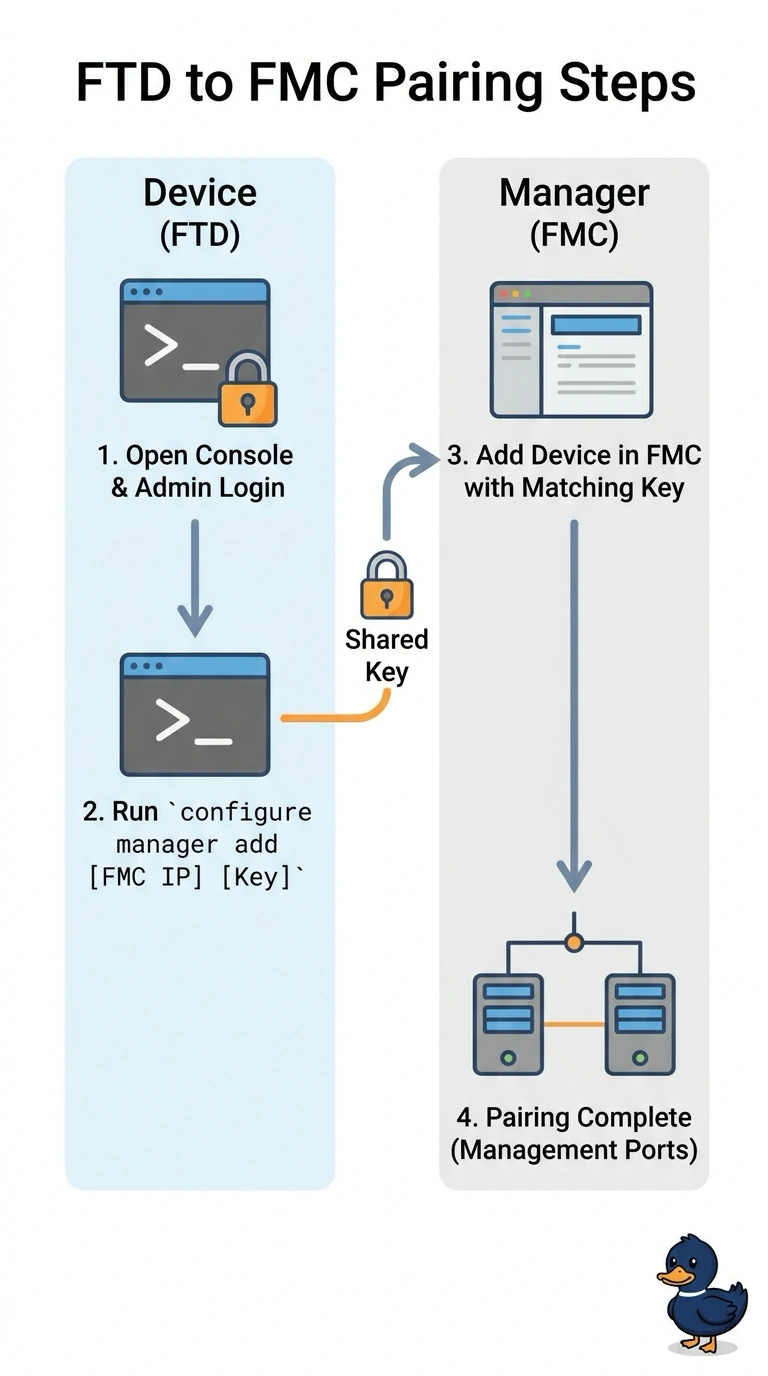
Short Explanation
Registration only works once the device has been told who its manager is. You're pairing two appliances with a shared key that both sides must hold, like collecting an order with the reference number you were given. Skip that console step and FMC has nothing to authenticate against.
Full Explanation
Registration is a two-sided handshake that starts on the device: the configure manager add command stores the Management Center address and a registration key on the FTD, which allows it to be claimed. Only then can the Management Center add the device, matching that same registration key, after which the appliances communicate over the required management ports, including TCP 8305. Adding the device with credentials alone fails because an unconfigured box has no prior relationship with the manager, so there is no key to validate and the request never completes. Configuring the device and waiting for discovery fails because nothing in the Management Center learns about the branch FTD on its own; an administrator must still add it and supply the matching key. Pushing a manager setting over SSH fails because the Management Center does not drive device CLIs to establish management, and the branch box would still have no manager defined. Exam caveat: the add-device dialog fields differ by release, but the key must match exactly, including case. Practical check: confirm the management interfaces can communicate over the required management ports and that no address translation disrupts registration.