
A new Meraki WLAN for contractors must use SSID "Contractor", but the appliance has no VLAN 30 yet and the firewall rule list starts with a broad allow rule. The WLAN must run on VLAN 30 and stay clear of the internal server subnet. Which API configuration sequence for the SSID, VLAN and firewall rules delivers all three requirements?
Select an answer to reveal the explanation.
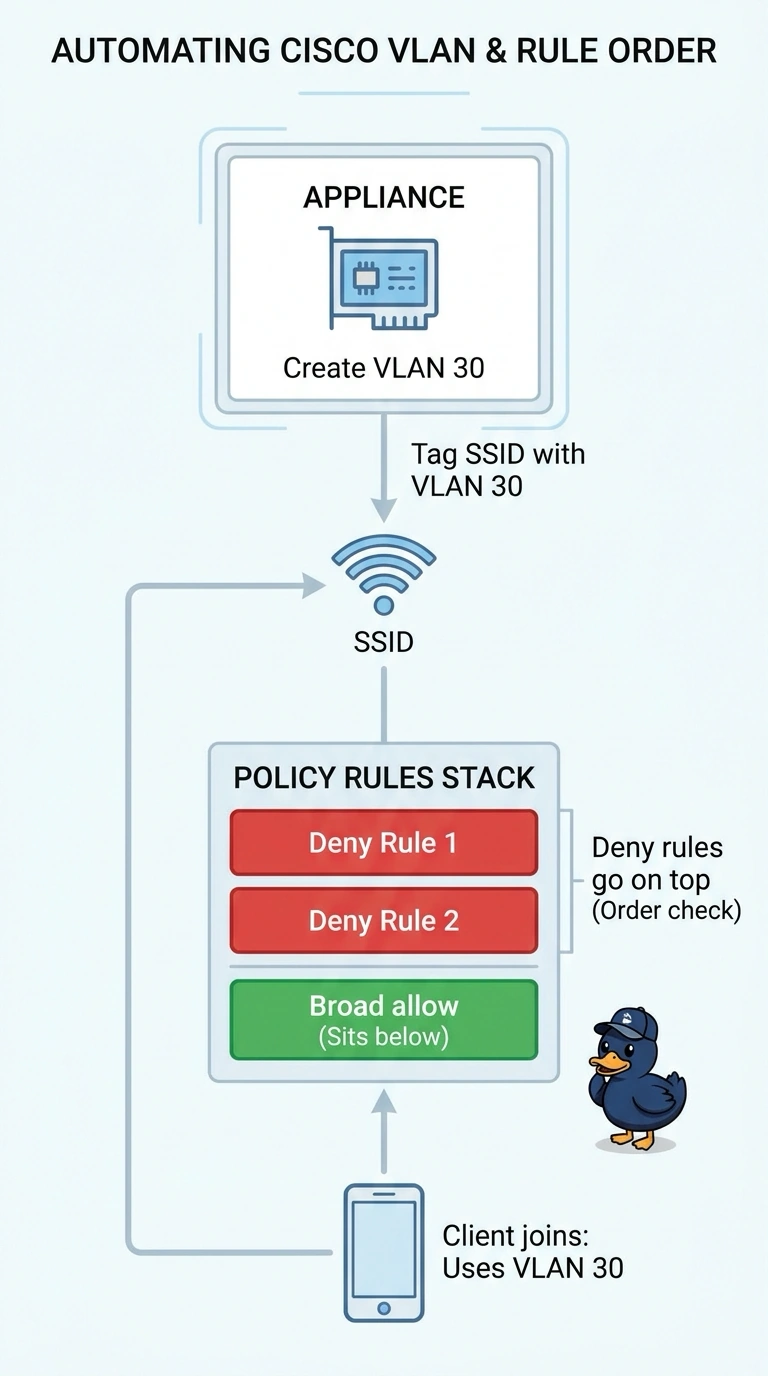
Short Explanation
Three API changes have to line up: a VLAN on the box, a tag on the SSID, and rules in the right order. Meraki checks firewall rules top down, so a deny added below a broad allow that matches the traffic will not take effect. Miss one and you've got a contractor WLAN on the wrong network.
Full Explanation
Meraki builds a WLAN from three layers that all have to agree for the SSID to behave as designed. The appliance needs VLAN 30 defined in its VLAN settings before it can route traffic for that subnet, the SSID setting tells access points to tag client traffic into that VLAN, and the L3 firewall list is evaluated from top down with the first matching rule winning. Defining the VLAN and tagging the SSID while inserting the denies after the existing broad allow lets that allow match first, so isolation does not happen for traffic it permits. Skipping the VLAN definition leaves the SSID tagging frames the appliance has no interface to route, appending the denies at the bottom puts them behind a rule that already matched, and leaving the SSID on its default VLAN keeps wireless clients off VLAN 30 no matter how the wired side looks. One caveat: a firewall PUT replaces the whole ordered list, so always send every rule in the order you want. A practical check is to read the rules back after the call and confirm a client on the contractor WLAN lands on VLAN 30.