
A new branch must be stood up with zero console clicks: one standalone Meraki network, separate from any configuration template, needs an MX layer-3 firewall rule set, an enabled SSID, and an additional switch VLAN created through the dashboard REST API in a single run. Which sequence of API calls should the script perform?
Select an answer to reveal the explanation.
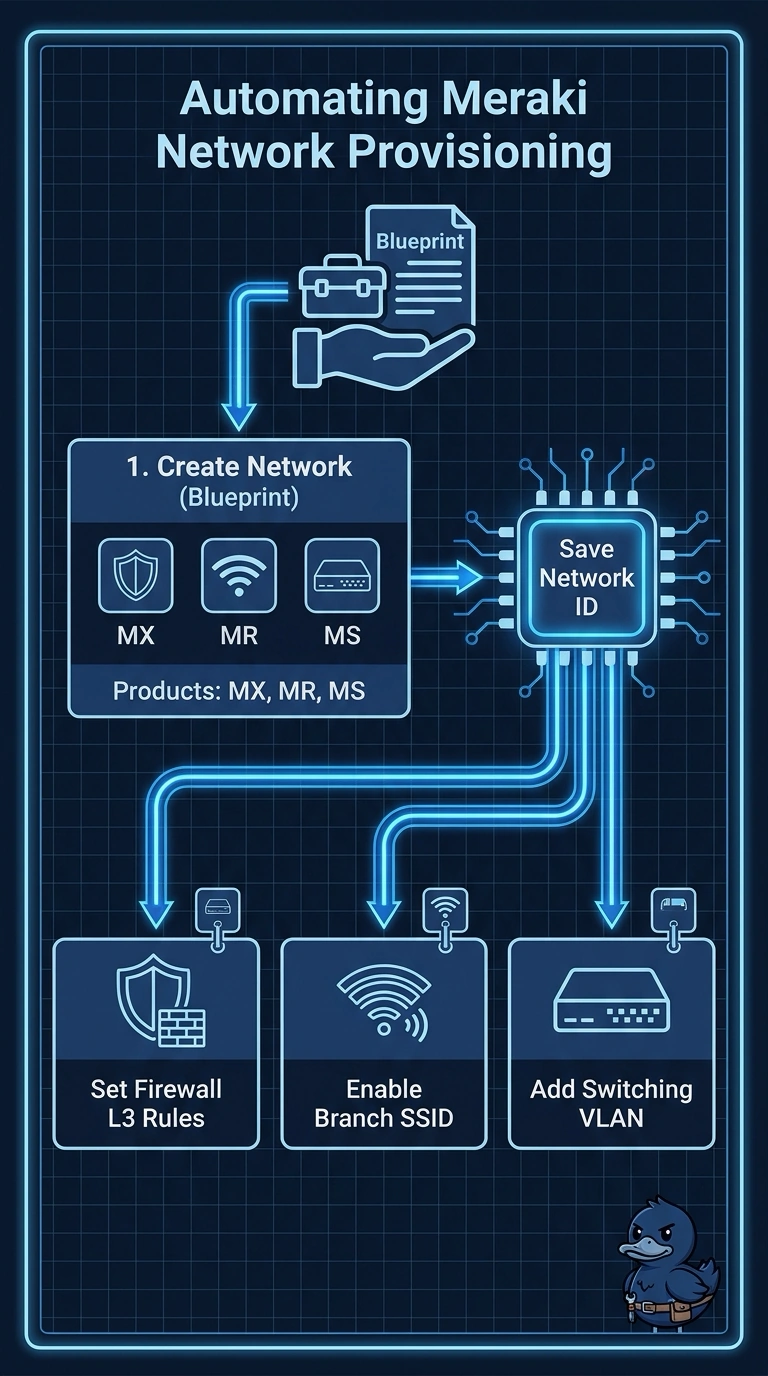
Short Explanation
Creating the network first is like booking the hall before sending invitations, since the ID you get back is what these later calls need. Declaring all three product types up front makes the appliance, wireless, and switching configurations available for that network. Skip that and the wireless configuration call cannot be made for the network.
Full Explanation
The correct sequence creates the standalone network with every required product type before configuring it, then uses the returned network ID for the firewall, SSID, and VLAN requests. The product types must be declared at creation so the network supports those configuration endpoints, and the network ID provides the target for the subsequent calls. Creating the VLAN in a follow-up run is a reasonable staged deployment pattern, but it misses the requirement that the entire setup happen in a single run. Creating and binding a configuration template is a common way to standardize branch settings, but it makes the branch template-managed rather than separate from any configuration template. Creating the SSID with enabled set to false may be useful for staging or delaying service activation, but it fails the explicit requirement for an enabled SSID. Exam caveat: “single run” means the script should perform all required operations in one execution; it does not necessarily mean one API request, since these settings use separate calls. Practical check: after the script completes, query the network and its firewall rules, SSID settings, and VLAN list to confirm all resources exist on the returned network ID and the SSID is enabled.