When designing a high-performance training pipeline for large datasets in TensorFlow, what is the primary role of the tf.data API?
Select an answer to reveal the explanation.
Short Explanation and Infographic
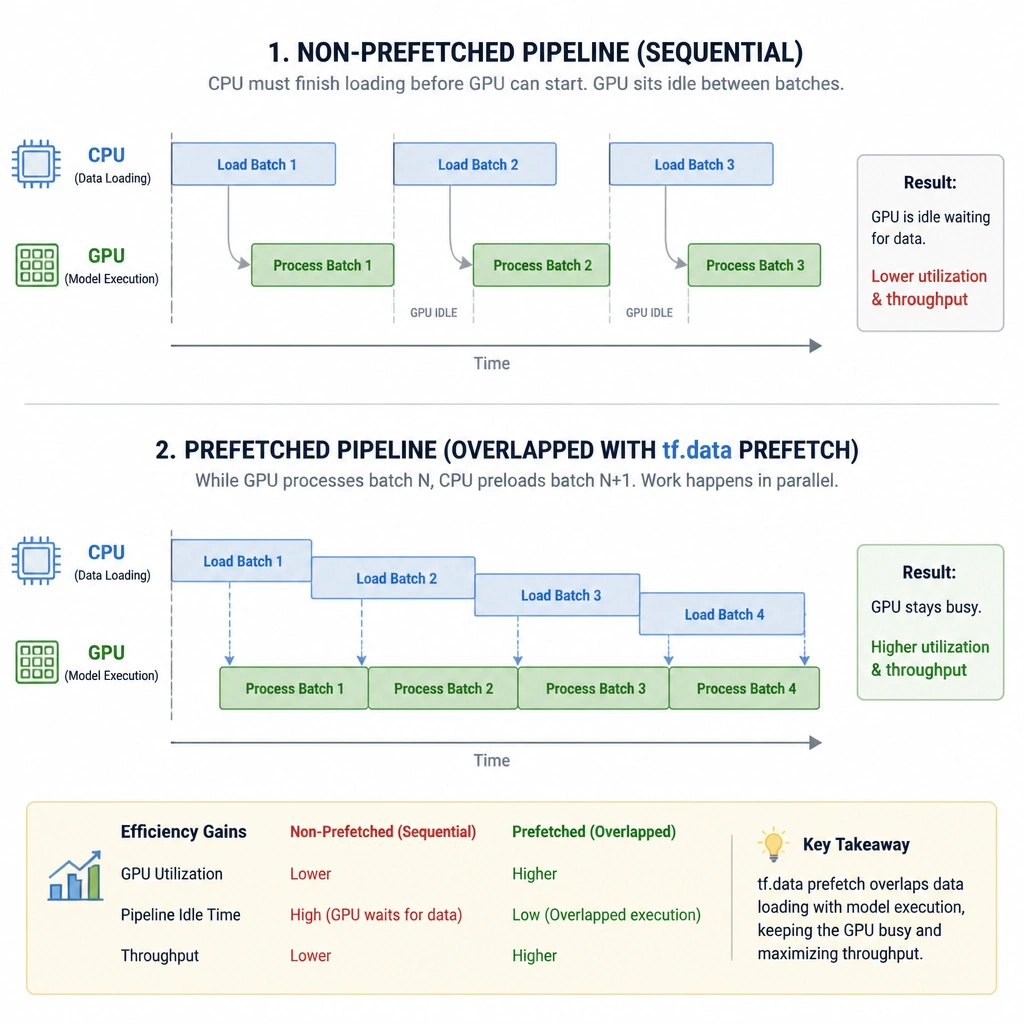
Imagine your boss walks in and says they just bought a fleet of top-of-the-line GPUs for AI training. You set up your training loop, but you notice the GPUs are sitting idle half the time. What's happening? You've got a CPU bottleneck! The CPU is struggling to load and preprocess images from the disk fast enough, leaving the GPU waiting around doing nothing. That's a massive waste of resources. The tf.data API is TensorFlow's way of solving this. Think of it like a smart conveyor belt: it loads the next batch of data, applies transformations (like resizing or cropping) on the CPU, and prefetches it directly into memory so the GPU always has a batch ready to process. That's why Option B is your winner.
Full explanation below image
Full Explanation
In deep learning, training speed is often limited by data delivery rather than computation. A GPU can execute a forward and backward pass much faster than a CPU can load, decode, and preprocess data from a hard drive. This is known as the "input bottleneck." The tf.data API provides the tools necessary to build input pipelines that operate asynchronously. By abstracting data as a tf.data.Dataset object, developers can chain together performance-optimized operations: - .map(): Applies transformations (such as normalization or augmentation) across multiple CPU threads. - .batch(): Groups consecutive elements of the dataset into batches. - .shuffle(): Randomizes the order of dataset elements. - .prefetch(): Overlaps the preprocessing work of the CPU with the model training work of the accelerator (GPU/TPU). While the GPU is training on batch $N$, the CPU is already reading and preprocessing batch $N+1$ in the background.
Let's review the incorrect distractors: - Option A refers to model saving and serialization, which is handled by APIs like tf.saved_model or model.save(). - Option C describes hyperparameter tuning, which is typically managed by libraries like KerasTuner, not the data loading API. - Option D describes model evaluation, which is performed by methods like model.evaluate().