
When processing PDF documents with Claude, which approach is MOST commonly supported?
Select an answer to reveal the explanation.
Short Explanation
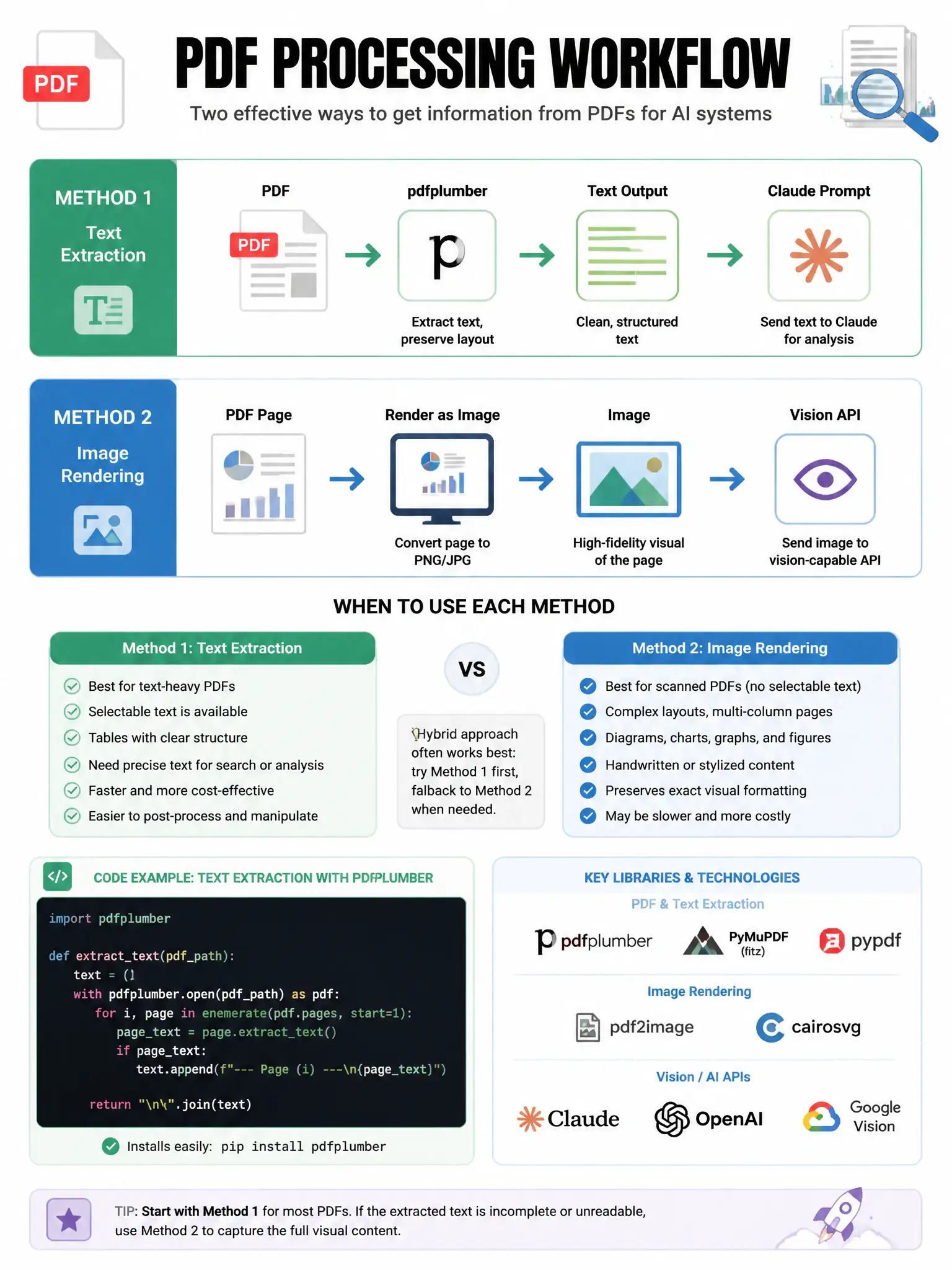
You'll get the most reliable results by extracting the PDF's text yourself and sending it to Claude as text. If the PDF has tricky layouts or charts, you can render pages as images and use vision. Don't count on a direct PDF upload endpoint or native binary processing.
Full Explanation
The most widely supported method for PDF processing is text extraction: use a PDF parsing library, such as PyMuPDF, pdfplumber, or pdfminer, to extract text content, then include that text in the Claude API prompt. For PDFs with complex layouts, charts, or non-extractable text, rendering PDF pages as images and sending them through the vision API can work. Some newer API integrations support native document types, but text extraction remains the most universally applicable approach. The dedicated PDF endpoint that returns Claude-ready text without a prompt describes a file upload endpoint that doesn't exist in the standard Anthropic API. The approach that says PDFs are automatically converted to images when uploaded via URL describes an automatic conversion that doesn't happen. The approach that says Claude can process native PDF binary data without any extraction is also not the standard supported path; while some progress is being made, native PDF binary processing has not been a standard feature.